SMS Opt-In Evidence
1. Program and messages
The program is Command Genius by Techneeks LLC. Techneeks LLC is the legal entity that owns and operates Command Genius and is the brand registered for this campaign. Messages are sent from a single shared Command Genius sending identity.
Command Genius sends operational and transactional messages only. Message types are account alerts, ticket updates, dispatch notifications, assignment alerts, support updates, incident notifications, and transactional responses to customer-initiated requests. Recipients are employees, managers, and technicians of a client business, and customers receiving a transactional response to a request they initiated.
Command Genius does not send marketing, promotional, bulk broadcast, cold outreach, purchased-list, or lead-generation messages under this program.
2. The two consent flows
Consent is captured in two places in the product, and only these two. Self-service account creation is not available in Command Genius, so there is no signup consent path. Accounts exist only when an existing client business invites a user.
Each block below is an inert reproduction of what the user actually sees, rendered from the shipped source rather than described. The controls are disabled, there is no form element, and no script runs. Neither block can record consent, and neither is presented as a place to opt in. Consent is recorded only inside the product.
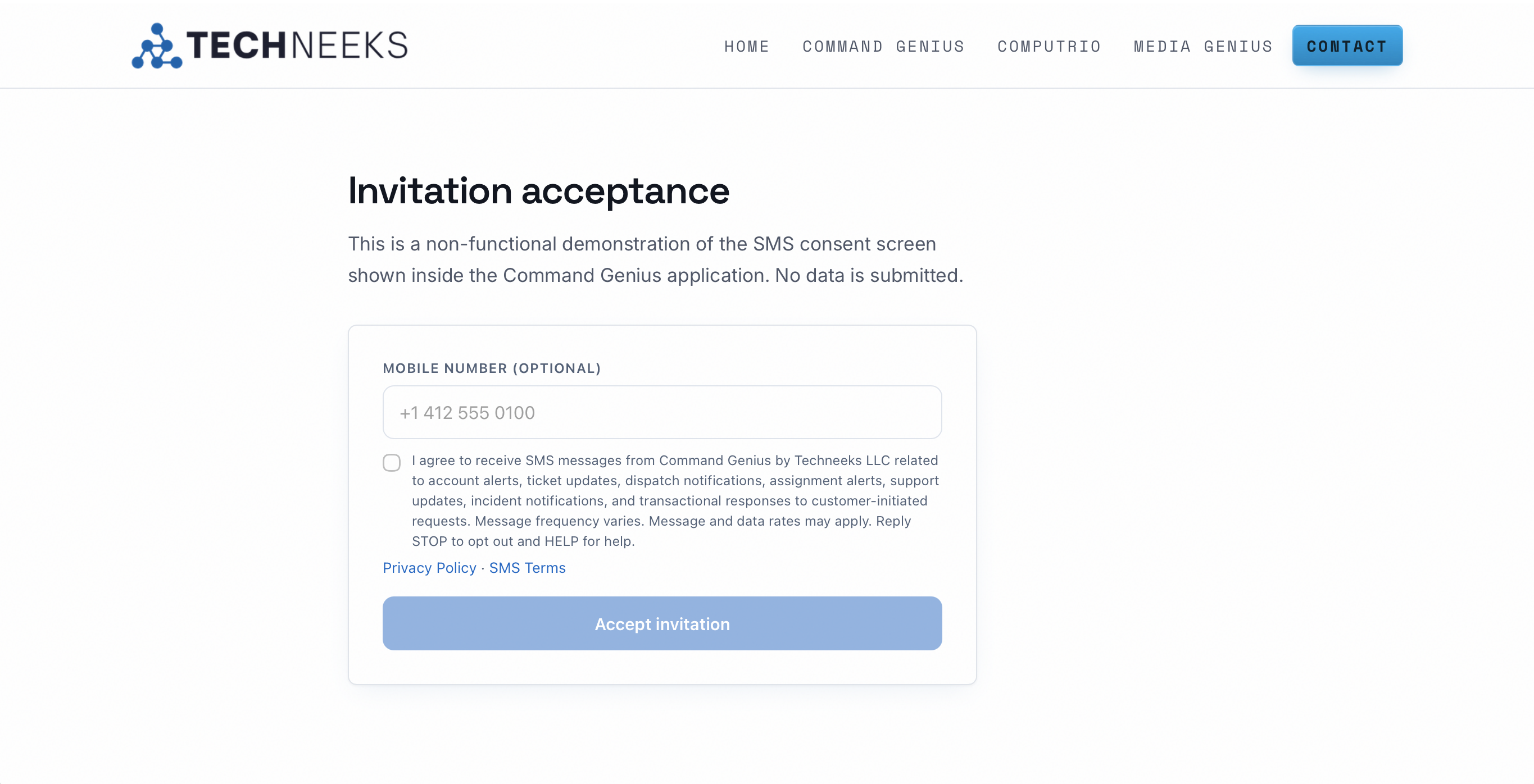
Flow 1 — Invitation acceptance
An existing client business invites an employee, manager, or technician. The invited user opens the invitation link, sets a password, and sees the consent block below on the same page. The mobile number is optional and the consent checkbox is unchecked by default. Leaving the box unchecked completes the invitation without enrolling the number.
Source: public/reset.html lines 76 to 85, authored 2356e49, shipped on main 3d550c5. Changes from the shipped markup, and nothing else: wrapped in div.cg-consent-replica; ids sms-phone, sms-consent, consent-text prefixed cgr- with label for and aria-describedby following; both inputs given disabled; the surrounding form element omitted.
Open the invitation acceptance demonstration page, the non-functional page the capture below was taken from.
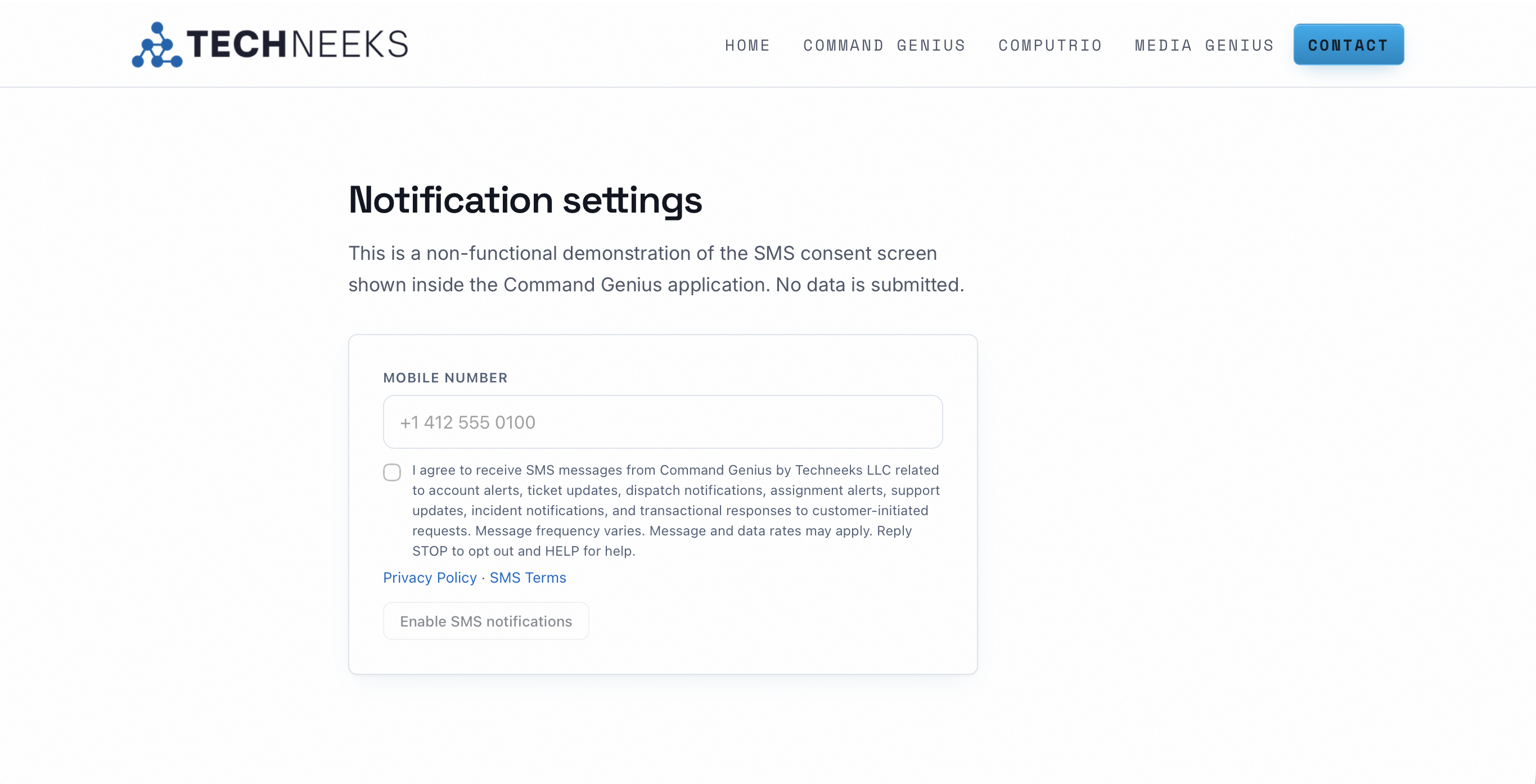
Flow 2 — Notification settings
An existing user opens Settings, My Account, and enrolls from the SMS notifications section. The user enters or updates a mobile number and checks the consent box. The Enable SMS notifications action stays disabled until the box is checked. A user who declined at invitation can enroll here later, and a user who enrolled can revoke here.
Source: src/routes/settings.index.tsx, SmsConsentSection, capture branch, same commit. The consent text and the two links are identical to flow 1; the shipped Settings page renders the same string from its CONSENT_DISCLAIMER constant. Disclosed differences in this reproduction: the shipped Settings page is built with Tailwind utility classes, which this site does not load, so the block is reproduced using the self-contained stylesheet from flow 1 with the three documented Settings differences applied, namely the label reading Mobile number without optional, rel noopener noreferrer on both links, and the disabled Enable SMS notifications action. Text and behavior are unchanged.
Open the notification settings demonstration page, the non-functional page the capture below was taken from.
3. Frequency and rates
Message frequency varies. Message and data rates may apply. Messages are sent in response to operational events, so volume depends on the activity on a client account rather than a fixed schedule. There is no recurring campaign send and no bulk broadcast.
4. How consent is recorded
Both flows write a row to the sms_consents table at the moment consent is given. The record captures the following, and every row is tagged to the client business account it belongs to.
| Field | What is recorded |
|---|---|
| Phone | The mobile number enrolled, stored in E.164 form. |
| Status | Whether consent is currently granted or revoked. |
| Source | Which of the two flows captured it, invitation acceptance or notification settings. |
| Timestamp | The date and time consent was captured, stored in UTC. |
| Policy versions | The version of the consent disclaimer shown, and the versions of the Privacy Policy and SMS Terms in effect at that moment. |
| Revocation | When consent is withdrawn, the row is stamped with the revocation timestamp and the status becomes revoked. The record is retained rather than deleted, so the consent history stays auditable. |
Because the policy versions in effect are stored on the row, the exact language a given user agreed to can be reproduced later, including after the published policies change.
5. STOP, HELP, and START
A reply of STOP opts the number out. The opt-out is written to the consent record and the number is suppressed at the platform level, so Command Genius stops sending to it before any carrier-level or aggregator-level block is relied on. Suppression applies across the whole program, because Command Genius uses one shared sending identity. A reply of START resubscribes the number where the carrier supports it. A reply of HELP returns program and contact information.
6. Policies
The consent language in both flows links to the two policies below, and the versions in effect at the time of consent are stored on the consent record.
- Privacy Policy, including the SMS privacy section. Opt-in consent and mobile numbers are not sold, rented, or shared with third parties or affiliates for their own marketing or promotional purposes.
- SMS Terms, the full program terms for Command Genius messaging.
For questions about this program, contact Techneeks LLC at operations@techneeksweb.com or 724-252-2449.